

Your health score is green. Usage is steady. The last QBR went fine.
Then one of your accounts posts a job on LinkedIn.
The requirement: 3+ years administering your competitor’s product.
The switch is already budgeted. Nobody on your team saw it, because nobody reads their customers’ job posts.
Health scores read what happens inside your product.
Renewals get decided outside it → a job board, a LinkedIn update, a proposal forwarded to procurement, a promise buried in a sales call.
That gap is where AI agents for customer success earn their place.
An agent is a scheduled job that reads a source, compares it with last week, and tells you what changed.
It checks every day without getting bored. You and your CSMs can’t.
Most AI agent lists stop at the alert.
The list I’m sharing today follows the renewal clock, from handoff to the renewal call.
For each of the 12 agents you get → the signal, the play when it fires, and the false alarm to ignore.
What 3,000+ CS Job Postings Say About AI
I went through the TopCSJobs data → 3,033 Customer Success postings since March, pulled straight from employers’ own hiring systems.
In the last 90 days, 63% of CS postings mention AI somewhere. Only 30% put it in the actual requirements or responsibilities.
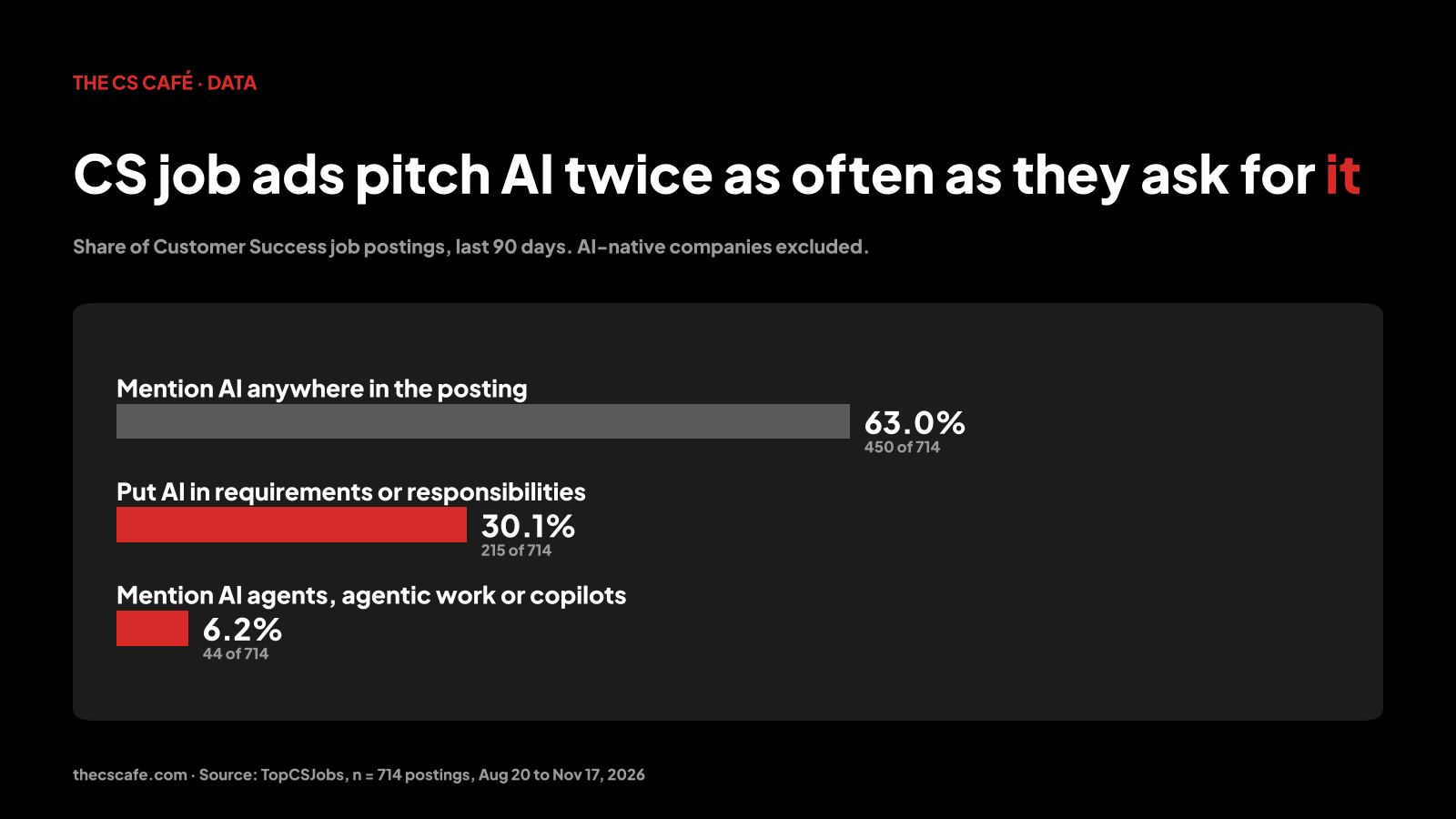
Companies pitch AI about twice as often as they hire for it.
When AI does make it into the job, it’s mostly about your own work. I checked 40 postings by hand. 28 asked the CSM to use AI day to day. 11 asked them to help customers adopt AI products.
Here’s what employers actually write →
“You use AI tools daily in your CS work and can point to specific workflows.” (Sona)
AI for everything from “preparing for customer conversations to spotting risk” (Culture Amp)
“The ability to build simple automations or workflows considered a strong plus.” (Findigs)
ServiceNow, Thomson Reuters, Workday, Okta, MongoDB and Culture Amp write AI into the most CS roles.
Two findings surprised me.
AI in the job ad comes with no pay bump. US CSM postings with AI in the requirements advertise a median base of $120,000. Those without advertise $117,910.
That’s the same pay. AI is becoming the baseline.
And agents barely show up. About 6% of postings mention AI agents, agentic work or copilots.
So employers now ask “can you use AI?” Very few ask “can you build an agent that protects a renewal?”
The CSM who can show one is answering a question most candidates never get asked. The 12 agents below are a good place to start.
Want to see which companies are hiring CSMs with AI skills right now? Browse the latest CS roles on TopCSJobs →
How I counted: 714 CS-titled postings first seen on TopCSJobs between Aug 20 and Nov 17, 2026, reposts removed. AI-native companies (like Anthropic and Harvey) and boilerplate such as AI-tool perks are excluded. Salaries are advertised USD base pay for CSM roles since March.
Handoff: Day 0 to 30
The cheapest time to fix a renewal is the first month.
1. The Promise Log
Every deal closes with promises CS never hears. “That’s on the roadmap.” “We can customize that.” They come back at renewal, from an annoyed champion.
The agent reads every closed-won call transcript and pulls out the commitments → who promised what, to whom, by when.
When it fires → bring the log to kickoff.
Confirm in writing which promises are committed, which are roadmap, and which are off the table. Correcting a promise on day 5 costs nothing. After a year, it costs the renewal.
False alarm → “we’re exploring that” and “great idea” are polite noise. Only flag promises with a date or a specific feature.
Setup → sales call transcripts, runs at every closed-won deal
2. The Onboarding Stall
Your retained customers share a few first-month actions that churned customers skipped.
Every quarter, the agent finds those actions in your own data. Then it checks each new account against them.
When it fires → an account that hasn’t completed the key actions by day 30 gets a working session with the CSM. A check-in email won’t fix a stall.
False alarm → enterprise rollouts with a planned go-live date. Measure those from go-live.
Setup → product analytics, runs weekly for accounts in their first 90 days
Mid-Term: The Silent Drift
Renewals often start slipping in months 4 to 9, when nobody is watching.
3. Champion Job Changes
When your champion leaves, the account loses its internal voice for you. Most teams find out at the renewal call, when a stranger asks why they pay for this.
When it fires → two moves within 14 days.
Find and meet the new owner at the old account. Then congratulate your former champion and ask how their new team handles the problem you solve.
They already trust you.
False alarm → a promotion inside the same company. That can be good news, so check whether they still own the budget.
Setup → public professional profiles of named champions, runs weekly
Full recovery play → Champion Loss Recovery Framework
4. The Executive Sponsor Going Silent
Executive sponsors rarely announce that they’ve lost interest. They stop replying, skip the QBR, and send a delegate.
When it fires → stop sending the sponsor updates. Send one question only they can answer → “What would make next year a clear win for your team?”
False alarm → leave, sabbaticals, a known reorg. Log them so the agent skips those accounts.
Setup → calendar, email and QBR attendance, runs weekly, flags after 60 days of silence
When the whole account goes silent → The Silence Operating System
5. Job Postings That Name Your Competitor
This is the one from the intro.
When one of your accounts posts a job that requires experience with your competitor’s product, the switch is already decided, or at least budgeted.
The opposite signal matters too. A posting for someone to own your tool means they’re doubling down.
When it fires → if a competitor is named, escalate the same week, exec to exec.
If your tool is named, offer to help onboard the new hire and use that to open an expansion conversation.
False alarm → large companies run different tools in different business units. Check which team is hiring.
Setup → careers pages of your accounts, with a keyword list of competitor names and your own product name, runs weekly
6. Shipped Requests, Timed to the Renewal
When a feature ships, the agent finds every account that asked for it and drafts a note: “You asked for this in March. It’s live.”
The twist is timing.
If the account renews within six months, the note comes from the CSM with an offer of a 15-minute walkthrough.
For everyone else, a short note is enough.
False alarm → requests that sales paraphrased into the log. Check the customer’s original wording before you write “you asked for this”.
Setup → release notes and your feature request log, runs on every release
The Renewal Window: 120 Days Out
From here on, every week of warning is a week of options.
7. Ticket Tone Against Their Own Baseline
Some accounts are always loud. Others go silent when they give up. The useful signal is change compared with the account’s own normal.
When it fires → read the three tickets driving the trend yourself. Then call the person who wrote them, and skip the champion for this one.
False alarm → a single bad incident that got resolved. Look for a trend of three weeks or more.
Setup → tickets, chats and escalations for accounts within 120 days of renewal, runs weekly
8. Your Customers on Competitors’ Logo Walls
If one of your accounts appears on a competitor’s customer page or case study, someone there is piloting or already signed.
When it fires → ask directly: “We saw you on their site. What are you using them for?”
Often it’s a different team or a small pilot. Finding out now beats finding out at renewal.
False alarm → old case studies from before they bought from you.
Setup → competitors’ customer pages and case studies, runs weekly
9. New Faces on Your Renewal Deck
When your renewal proposal gets opened by people you’ve never met, someone new has joined the decision.
Often procurement, finance or a new executive.
When it fires → ask your champion who joined, and offer the new people a 20-minute session. Get a one-page value summary to procurement before they ask for a discount.
False alarm → your champion forwarding the deck to their own deputy. Check against your known contacts first.
Setup → opens on tracked proposal and QBR links, runs on every open
10. The QBR Prep Pack
This agent pulls the others together.
Ten days before each QBR, it assembles usage trends, the goals set at the last QBR, open tickets, the promise log and every stakeholder change from agents 3, 4 and 9.
When it fires → the CSM edits a draft narrative instead of starting from a blank slide. Open with the customer’s goals from last time and show progress against each one.
False alarm → none. It runs on a schedule. The risk is a CSM presenting the draft unedited.
Setup → runs 10 days before each QBR
Then fix the agenda → QBR Agenda Template for Exec Buy-In
60 Days Out and After
The renewal call should confirm a decision the customer already made.
11. The Value Review, Timed to the Renewal
Think of a Spotify Wrapped for each account, sent 60 days before renewal instead of in December.
When it fires → send it to your champion first and ask: “Anything you’d change before you share it?” Champions forward what they helped shape.
False alarm → accounts with weak numbers. If the review would embarrass your champion, fix the value story first. A thin review hurts more than none.
Setup → usage, outcomes and support history per account, runs 60 days before each renewal
12. Churned-Account Win-Back
Every churned account left for a reason. Reasons expire.
When it fires → lead with what changed: “You left over X. X shipped in June.” One line, one link, no pitch.
False alarm → accounts that left for a cheaper tool. A new feature rarely wins those back. A new executive sometimes does.
Setup → churn reasons in your CRM against company news, leadership changes and release notes, runs monthly
Where to Start This Week: Pick Three
Twelve agents at once is a dashboard nobody reads. Pick the three that match the problem that hurts most this quarter.
Renewals that churn without warning → 3 Champion Changes, 4 Silent Sponsor, 5 Competitor in Job Posts
Renewals that run late and messy → 1 Promise Log, 9 New Faces, 10 QBR Prep Pack
Flat expansion → 5 Job Posts, 6 Shipped Requests, 11 Value Review
Onboarding that leaks → 2 Onboarding Stall, 7 Ticket Tone
Run each one in shadow mode for four weeks. The agent reports, your team decides, and nobody gets an automated message yet.
At the end of the month, count how many alerts led to a real action. Keep the agents that changed a conversation.
Switch off the ones whose alerts nobody opened.
Lines Not to Cross
Watch accounts and the signals companies publish. Leave people’s private lives alone.
The fastest way to lose a renewal is a customer who feels watched.
Company signals are fair game → job postings, customer pages, press, release notes.
For individuals, stick to professional changes they publish themselves. No home addresses, no personal social accounts.
If you sell into Europe, tracking named people needs a lawful basis under GDPR. Check with your legal or privacy lead before you switch on agents 3, 4 or 9.
A human sends every message. The agent drafts, the CSM edits and sends.
What Happens After the Alert
Renewals get decided outside your product, so build agents that watch there.
An alert is only the start. The renewal is won or lost in what your team does in the next 48 hours.
Paid members walk into every renewal knowing the timeline, the risks and the exact conversation to have. And before a renewal plan or QBR narrative reaches leadership, they send it to me for a direct review.
If you want help choosing your first three agents and wiring them into your renewal process, book a 1:1 session →
Hakan, The CS Café
A free weekly edition on what protects your accounts and your career.